For macOS 14+  ·  OpenSubsonic / Navidrome

Your music server
deserves a real Mac app.

The interaction design iTunes got right — a dense sortable track list, a column browser, Up Next, fast search — rebuilt as a modern, restrained Mac app. Streaming-only, audiophile-grade playback, no Electron in sight.

Free & open source · MIT · Zero third-party dependencies
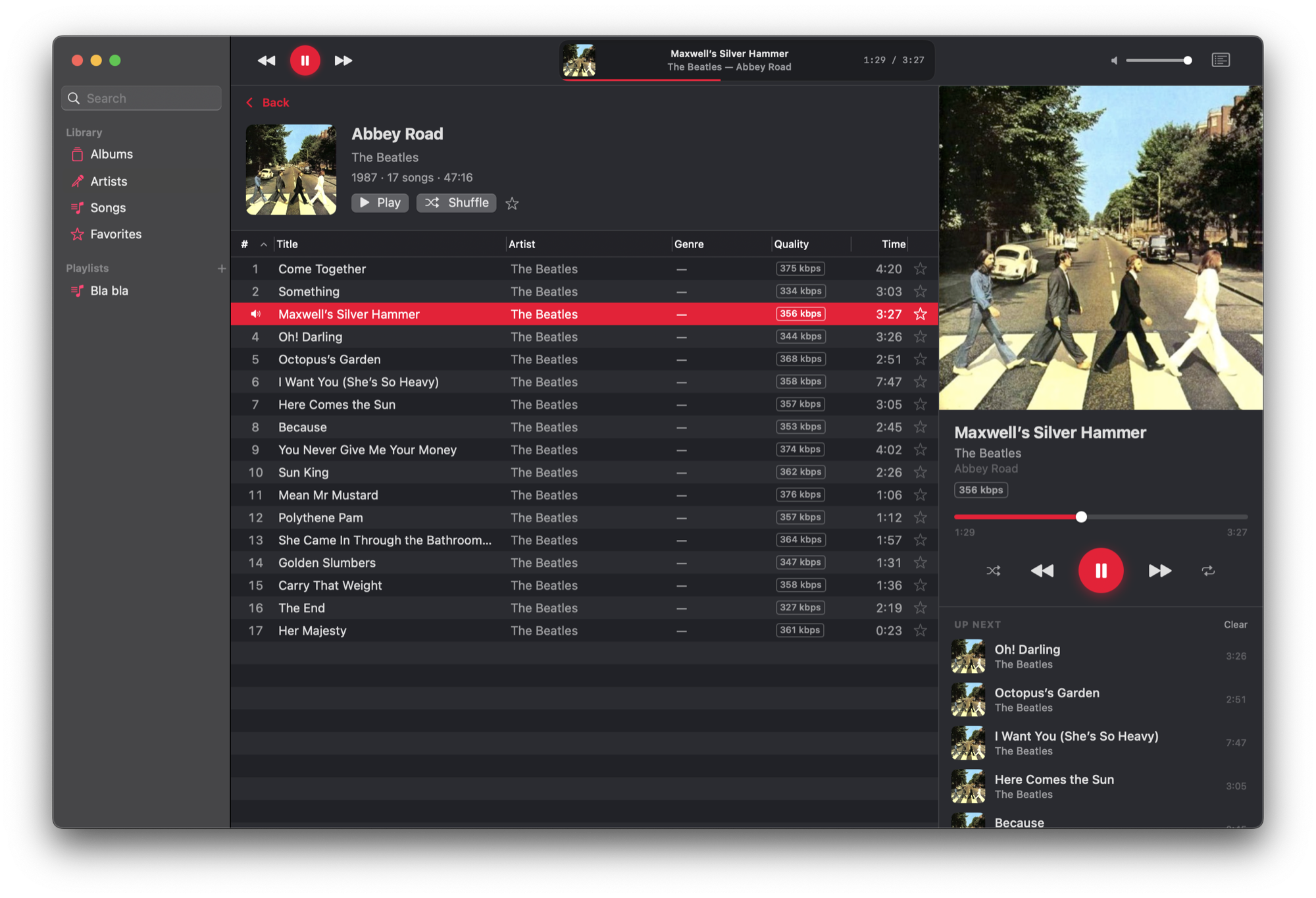
Sonicwave playing Abbey Road: sidebar with library and playlists, a dense sortable track table with quality badges, and a Now Playing panel with artwork and an Up Next queue.
01

Serious about audio

True gapless playback

Album transitions are seamless by construction — Abbey Road plays the way it was mastered.

Sample-rate matching

Audirvana/Roon-style hardware rate switching, on by default. Your DAC runs at each track’s native rate; nothing gets resampled.

Streaming decode

MP3, FLAC, AAC, WAV, AIFF and more decode as they stream — playback starts fast and memory stays flat.

Robust output routing

Pick any output device. Unplug and replug a USB DAC mid-track and playback recovers — your system-default device is never touched.

02

A library you can drive

A dense, sortable track table

Double-click or to play, -double-click to queue next, multi-select, drag to playlists.

Column browser & search

Genre → Artist → Album, just like you remember. Global search on ⌘F, quality badges with lossless-first sorting.

Playlists that round-trip

Create, rename, reorder, delete — server playlists stay fully in sync. Favorites everywhere, with a ★ column.

A proper Mac citizen

Menu-bar player, media keys, Control Center widget, Light/Dark, VoiceOver, state restoration. Sandboxed with a single entitlement.

Radio from any song

Right-click a track or artist and Start Radio — a similar-songs mix from your server’s metadata agent, with sensible fallbacks when it has none. Artist pages carry bios and similar artists.

Shuffle, two ways

Shuffle Library queues a 500-song mix of everything. Shuffle Albums plays whole albums back-to-back in random order — gapless stays gapless — and honors your genre or decade filter.

03

Spec sheet

Version
0.5.1
Platform
macOS 14 Sonoma or later
Server
OpenSubsonic — Navidrome, Gonic, LMS, Astiga, …
Formats
FLAC · MP3 · AAC · WAV · AIFF · more
Engine
Swift 6, strict concurrency, AppKit-core track table
Dependencies
Apple frameworks only — zero third-party
Distribution
Free direct download · Mac App Store in progress
License
MIT
04

Up and running in a minute

  1. Download

    Grab Sonicwave-0.5.1.zip from the latest release, unzip, drop it in /Applications. It opens right away — no security warnings.

  2. Connect

    Open Settings → Connection (⌘,), enter your server address and credentials, hit Test Connection.

  3. Play

    Credentials go straight to the Keychain — your password never travels in a URL. Your whole library, one away.

05

Changelog

0.5.1 Latest
  • Back means back — returning from an album now lands exactly where you left: the selected artist, your scroll position in Albums, Home and artist pages, even an expanded artist bio.
  • Reliability sweep — a systematic audit fixed ten subtle bugs: fast genre-switching can no longer show the wrong genre’s songs, quick artist/album switches and mid-typing searches no longer flash empty, and Home recovers gracefully from an offline launch.
  • Cross-device resume, more accurate — rapid track-skipping could save an older queue position over a newer one; saves are now strictly ordered.
  • Queue edits respect shuffle — a track queued with “Play Next” during shuffle stays next when shuffle turns off; a failed favorite-toggle now rolls back instead of showing the wrong star.
0.5.0
  • Start Radio — right-click any song or artist for a similar-songs mix, seeded by your server’s metadata agent (Last.fm or Navidrome’s sonic analysis). No agent? It falls back to top songs, then an artist shuffle — the button always plays.
  • Artist pages grew up — portrait, expandable biography, an Artist Radio button, and a Similar Artists shelf that navigates in place.
  • Shuffle Albums — whole albums back-to-back in random order, from the Controls menu or the Albums grid. Respects your genre/decade filter.
  • Runs on macOS 14 Sonoma — the minimum system dropped from macOS 15, welcoming 2018–2019 MacBook Airs back in.
  • Fixed: dragging multiple songs into Up Next or a playlist scrambled their order.
0.4.0
  • FLAC playback, actually fixed — a subtle decoder bug made FLAC albums play ~half a second per track, then skip on. They now stream gapless like everything else.
  • Unplayable formats play anyway — Ogg Vorbis and friends fall back to server transcoding automatically, whole album included.
  • Filter the Albums grid by genre or decade; Shuffle Library queues a fresh 500-song mix of everything.
  • Disc headers on multi-disc albums, with disc subtitles when tagged.
  • Cover-art fetching respects server rate limits (capped, with backoff) — no more permanently blank covers.
0.3.0
  • Your queue survives a relaunch — the queue, current track and playhead save to your server and come back paused, exactly as left. Other clients can resume the same session.
  • Volume normalization (Settings → Playback) — even out loudness with your files’ ReplayGain tags, by track or by album, with peak protection so nothing clips.
  • Plain-HTTP home servers connect now — addresses like http://nas.local were silently blocked by macOS; local plain-HTTP is allowed, and non-local http:// fails with a clear message.
  • Huge playlists no longer fail — creating or reordering past ~1,500 tracks now travels as a POST body instead of an over-long URL.
0.2.0
  • Home page — a time-of-day greeting, a “Jump Back In” card for your last album, and Keep Listening, Recently Added, Most Played and Random shelves.
  • Scrobbling, on by default — play counts and Recently Played stay in sync with your server (Last.fm rules).
  • AirPlay outputs appear in the device picker, properly labeled and rate-handled.
  • Library scan from the app: File → Update Server Library, with live progress in Settings.
  • Quick Look the cover at full resolution; Show Album in Library (⇧⌘L) jumps from the playing track to its album.
  • The Now Playing panel is resizable; tracks the server can’t stream now explain themselves instead of failing silently.
  • Use Demo Server — try Sonicwave with one click, no server required.
0.1.2
  • The accent red is back to its intended vividness (the color lives outside the sRGB gamut — the asset is now tagged Display P3).
  • Music-style sidebar selection pill; accent-red selections in the artist list.
  • Track-number column on the album page, disc-aware and doubling as the now-playing speaker column.
0.1.1
  • Toggling the Now Playing panel leaves the sidebar and toolbar perfectly still.
  • Album grids stay left-aligned at every window width; the volume slider no longer drags the window.
0.1.0
  • First public release — gapless playback, sample-rate matching, the dense track table, column browser, Up Next, server playlists, search, menu-bar player.

Full release notes on GitHub →